The End of "I Think We're On Track"
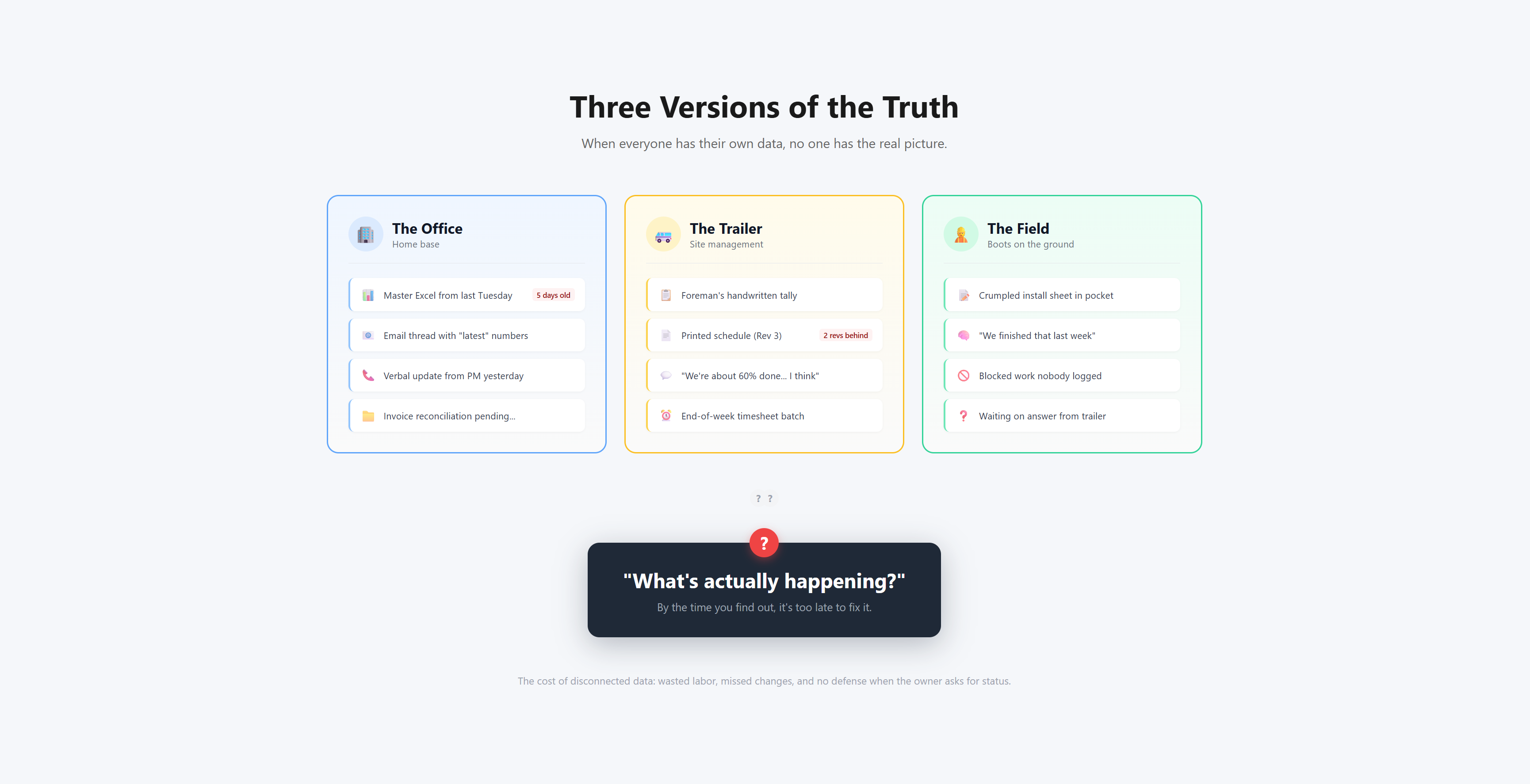
The office has a spreadsheet from last Tuesday. The trailer has a printed schedule two revisions behind. The field has a crumpled install sheet and a best guess. Three locations, three versions of the truth—and when the owner asks "Are we on track?", no one can answer with confidence. On complex installations, you pay for labor whether it's productive or not. And without a single source of truth connecting your team, you're managing your biggest risk with fragmented data and gut feel. PowerTrack changes that.
The Core Workflow: The PowerTrack Lifecycle
PowerTrack operates on a continuous lifecycle designed to minimize effort and maximize data accuracy.
- Setup: Define the project vocabulary (Codes, Labor Units, Users).
- Import: Ingest engineering data (Commodity Schedules) and financial data (Timesheets).
- Plan & Assign: Group work into Packages and assign to Foremen.
- Execute: Field teams install work using Digital or Print workflows.
- Measure: Track progress and productivity in real-time.
1. Role-Based Collaboration
A single source of truth, tailored to the user.
PowerTrack isn't just a tool for the office; it connects the entire project team. Everyone looks at the same live data, but what they see is optimized for their specific role.
- Project Lead: Full control over the project ecosystem. They manage the "Project Vocabulary" (codes, labor units), configure the system, and manage user access.
- Project Manager: Focuses on execution. They have full visibility into data, reporting, and assignments but cannot alter the fundamental project configuration or user access.
- General Foreman: The conductor of the field. They have broad authority to assign commodities to packages and packages to crews, ensuring the right work is queued up for the right people.
- Foreman: Focused execution. They see the Packages assigned specifically to them. They can enter installation data and view reports for their crew, but they aren't distracted by the noise of the entire project.
- Field View: A simplified, read-only view for general field staff to check installation status or cable routes without seeing sensitive financial data (like labor hours).
2. Project Setup & Configuration
Foundation for consistent data.
PowerTrack allows you to model the project exactly as it exists in your engineering diagrams and financial systems.
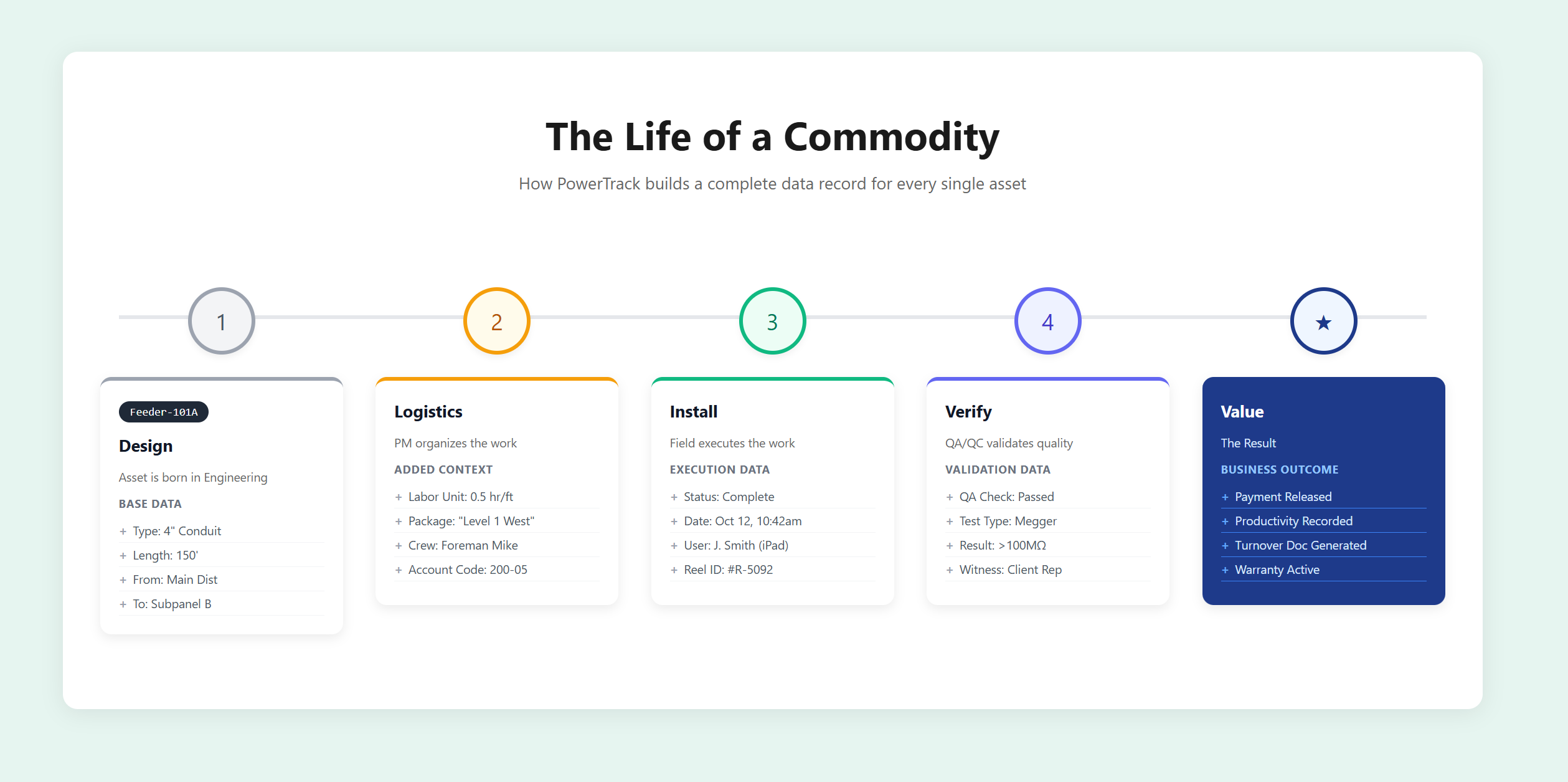
- Granular Commodity Definitions: Define specific types for Cables, Conduits, Cable Trays, Equipment, and Jumpers. You aren't just tracking generic "material"; you are tracking specific assets with specific labor values.
- Labor Units: This is the engine of the system. By assigning labor expectations to every commodity, the system automatically calculates "Earned Value" as work completes, giving you the baseline to measure actual performance against.
- Financial Integration (Account Codes): Support for up to 5 levels of Account Codes plus specialized Commodity Account Codes. Map every foot of cable to the exact cost code required by accounting.
- Reel Inventory: Dedicated management for cable reels, allowing you to track inventory levels and assign specific reels to specific cable runs.
3. Flexible Import Engine
Your engineering data, digitized instantly.
We know your data comes from diverse sources like Revit, Excel, or Engineering firms. PowerTrack treats import as a first-class citizen.
- Commodity Schedule Imports: Seamlessly import your master schedules. The system handles updates intelligently—if a new engineering revision is released, re-importing it updates only the changes while preserving your field progress.
- Change Reporting: Every import generates a detailed Change Report, showing exactly what was added, removed, or modified. No more guessing what the engineers changed.
- Timesheet Integration: Import labor hours from your existing time-tracking system to power the productivity engine.
4. Planning & Assignment
Turning data into actionable work.
Once data is in the system, PowerTrack helps you organize it into manageable chunks for the field.
- Work Packaging: Group commodities into Packages. Whether you organize by Room, System, or Priority, packages allow you to slice the massive project into executable work orders.
- Foreman Assignment: Specific packages are assigned to specific Foremen. This accountability is critical—it allows you to track productivity by crew, giving you insight into who is performing well and who needs support.
- Turnover Packages: Define and track packages specifically for the turnover/QA process.
5. Execution: Field Work & Data Entry
Digital efficiency with real-world practicality.
PowerTrack supports both modern digital workflows and traditional paper-based processes, ensuring adoption regardless of your field team's tech preferences.
- Digital Field Entry (iPad/Mobile): Field crews access the Field Work module to view assignments, mark items as installed, and enter QA data directly on the device.
- Smart Print Workflow: Install Cards: Generate detailed install sheets for every package. QR Codes: Every printed document includes a QR code. Scanning it instantly opens that specific item in the app for rapid updates.
- Restraint Management: Track "Blocked Work" formally. If a crew cannot install a cable due to an obstruction, they log a Restraint. This justifies schedule adjustments and ensures you never miss billable change orders.
6. Reporting & Analytics
Real answers to "Are we on track?"
This is where the data pays off. Instead of spending days compiling a report, you have real-time visibility.
- Productivity Reporting (Estimated vs. Actual): By Foreman: See exactly which crews are beating estimates and which are falling behind. By Commodity: Identify if specific types of work (e.g., "2-inch Conduit") are consistently running over budget. By Area: Pinpoint if a specific section of the job site is dragging down overall performance.
- Executive Summary: A high-level dashboard showing Project % Complete by length, % Complete by quantity, and Earned Hours vs. Burned Hours.
- Progress Projections: Visualizing installation curves to predict completion dates based on current velocity.
- QA/QC Documentation: Generate the exact documentation required for client handover, populated with the data collected throughout the project.
Why This Matters
Most companies accept that labor tracking is messy, manual, and delayed. They think "that's just the way it is."
PowerTrack proves it doesn't have to be that way.
- Eliminate "Busy Work": Stop paying skilled people to wrestle with spreadsheets.
- Defend Your Schedule: When the owner asks for status, you have data-backed answers immediately.
- Scale Your Business: By establishing a consistent process across all teams, you remove the chaos that prevents you from taking on more work.